
Coding with Claude
I was lucky enough to take a week off work in March over the kid’s spring break. We didn’t really have awesome weather during my week off in Vancouver so we spent quite a bit of time inside. During our movie and chill time I finally got a chance to use Claude Code to solve a real-world problem that I had and it was pretty impressive to see how much AI coding tools and agents have evolved in the past few months.
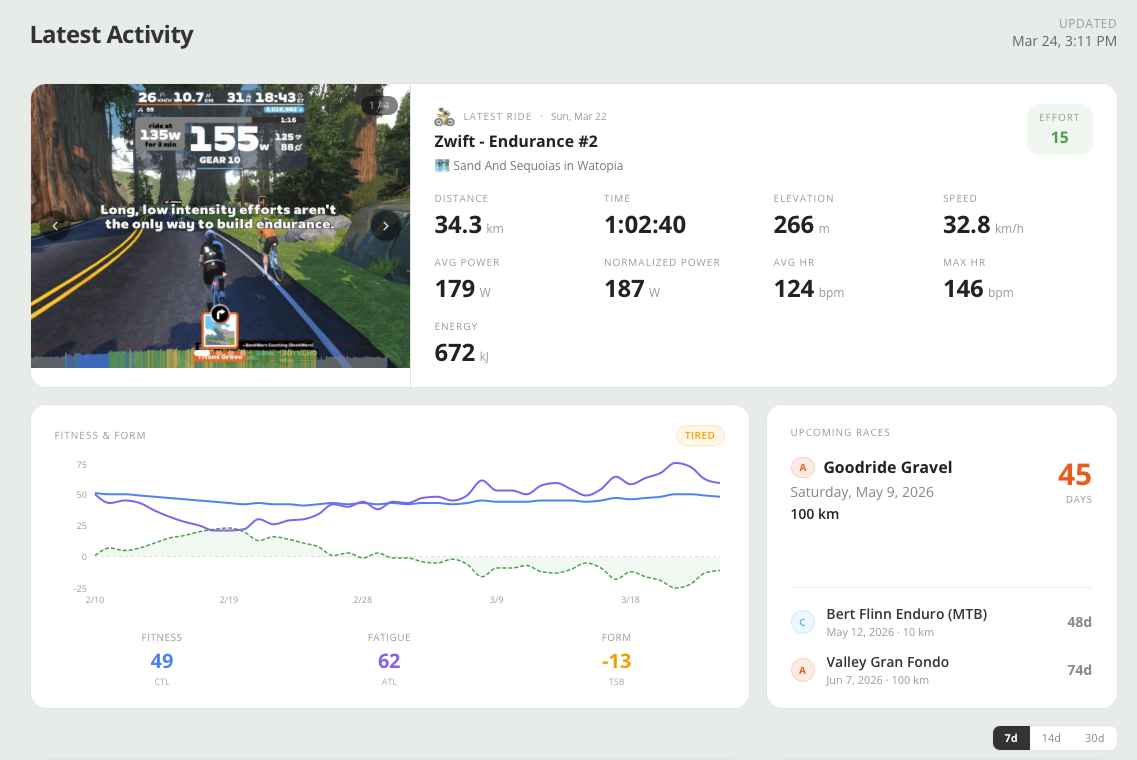
My goal was to create a publicly visible dashboard of my cycling and health data beyond the systems that I store this information in. I thought this would be cool to share with folks who aren’t on Strava or other fitness apps to get a glimpse of the data I track. The dashboard pulls data from my private Strava account as well as Intervals.icu for which I use to plan my training.
Stack
Next.js 16 (App Router) with React 19 and TypeScript 5
Tailwind CSS 4 for styling, Recharts 3 for data visualization
HLS.js for streaming activity videos, date-fns for date handling
Hosted on Vercel with standard Next.js deployment; no database required
Data Sources
The dashboard pulls from two APIs:
Strava API (OAuth 2.0 refresh token flow): Recent activities and activity photos/videos
intervals.icu API (Basic Auth): Wellness metrics (HRV, resting HR, sleep, mood, stress, fatigue, soreness, hydration), fitness modeling (CTL/ATL/TSB), HR zone data and upcoming race events
Architecture
All data fetching happens server-side in a single page component. API calls to Strava and intervals.icu run in parallel using Promise.allSettled(), so a failure in one source doesn't take down the whole page. Interactive components (charts, carousels, rolling-window toggles) are client components that receive data as props.
Caching is handled through Next.js Incremental Static Regeneration (ISR) with a 1-hour revalidation window so the page is statically generated and refreshed in the background hourly. Strava OAuth tokens are cached in-memory with deduplication to prevent concurrent refresh races.
Look & Feel
I was able to prompt Claude to match the look & feel of my website here and it did a fairly good job of matching the template style and colours on the site. It’s not perfect but it does integrate nicely and also stands alone at activity.dylanhansen.ca.
At the time of writing I have probably put about 4 hours of work into this dashboard which would have taken me weeks in the past. It’s been a fun challenge to learn how to prompt an AI system to build this and also have a simple pipeline for deployment (Claude Code to GitHub to Vercel). I’m looking forward to continuing to tinker with this in my (limited) free time as a way to advance my knowledge of AI coding assistants!